Logitech MX Keys S Review 2026: The Best Wireless Keyboard for Professionals
Logitech MX Keys S Wireless Keyboard Review 2026: The Best Productivity Keyboard for Professionals
Logitech has long been a leader in productivity peripherals, and the Logitech MX Keys S Wireless Keyboard represents the pinnacle of their keyboard design. After using this keyboard daily for several weeks, I can confidently say it is one of the best typing experiences available for professionals who spend long hours at their desk.
The MX Keys S builds on the success of the original MX Keys with improved backlighting, better key stability, and enhanced smart illumination that adapts to your environment. Available in Graphite, Pale Grey, and Rose color options, it fits seamlessly into any workspace aesthetic.
Design and Build Quality
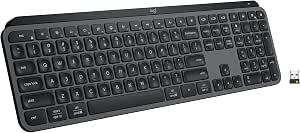
The MX Keys S features a full-size layout with a precision-machined metal frame that gives it a premium, solid feel. The keyboard weighs approximately 810 grams, providing enough heft to stay firmly planted on your desk without sliding around during intense typing sessions. The low-profile keys are slightly concave, perfectly matching the shape of your fingertips for comfortable, accurate typing.
The dark gray keycaps with white lettering offer excellent contrast and readability, even in low-light conditions. The overall design is minimalist and professional, with no unnecessary branding or flashy elements. Check the latest price on Amazon.
Typing Experience
The typing experience on the MX Keys S is exceptional. The keys have a perfect amount of travel — not too shallow like a laptop keyboard, not too deep like a mechanical keyboard. The scissor-switch mechanism provides a satisfying, quiet actuation with every keystroke.
For professionals who type for hours on end, this keyboard is a joy to use. The low-profile design reduces wrist strain, and the perfect key spacing means you can maintain your typing speed without errors. The quiet operation means you will not disturb colleagues in an open office environment.
Smart Illumination and Backlighting
The MX Keys S features Logitech Smart Illumination technology. The keys automatically light up when your hands approach the keyboard and adjust brightness based on ambient lighting conditions. This genuinely improves the typing experience in dimly lit environments. The backlighting automatically adjusts to conserve battery life.
Connectivity and Compatibility
The keyboard supports three connection methods: Bluetooth, Logitech Bolt USB receiver, and USB-C wired connection. You can pair up to three devices and switch between them instantly with dedicated Easy-Switch keys. It works seamlessly with Windows, macOS, Linux, Chrome OS, and mobile devices.
This multi-device capability is a game-changer for professionals who work across multiple computers. One press of a button and you can switch from your desktop PC to your laptop to your tablet. Buy the Logitech MX Keys S on Amazon.
Battery Life
The MX Keys S offers up to 10 days of battery life on a full charge with backlighting enabled, or up to 5 months without backlighting. The USB-C charging port makes it easy to top up, and a quick 1-minute charge provides enough power for several hours of use.
Programmable Keys and Productivity Features
The keyboard includes programmable Fn keys that can be customized using Logitech Options+ software. You can assign shortcuts for screen capture, emoji panel, dictation, and more. The Fn key row also includes dedicated keys for mute, microphone, and media controls.
Pros and Cons
Pros
- Excellent typing feel with quiet, stable keys
- Smart illumination that adapts to ambient light
- Multi-device support with easy switching
- Premium build quality with metal frame
- Long battery life with USB-C charging
- Programmable keys for productivity
Cons
- No wrist rest included (MX Palm Rest sold separately)
- Not ideal for gaming (low-profile keys)
- Higher price point than basic keyboards
Final Verdict
The Logitech MX Keys S is the gold standard for productivity keyboards in 2026. It combines exceptional build quality, a superb typing experience, and thoughtful features like Smart Illumination and multi-device support. For professionals who spend significant time typing, this keyboard is an investment that pays for itself in comfort and productivity.
If you are looking for a premium wireless keyboard that will transform your daily typing experience, the Logitech MX Keys S is the one to get.
Check out other hardware reviews: Logitech MX Master 4 Review | Samsung Galaxy Book4 Review